

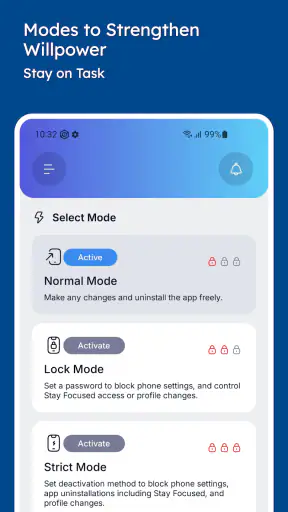
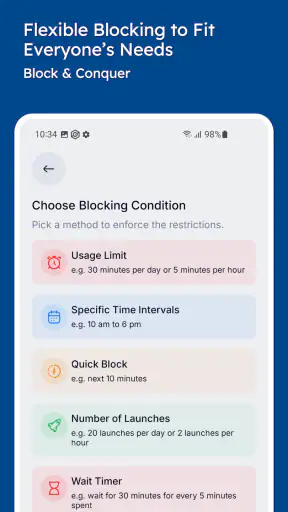
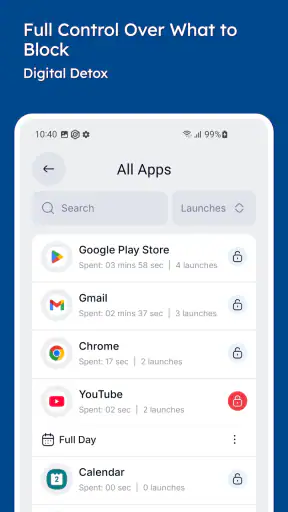
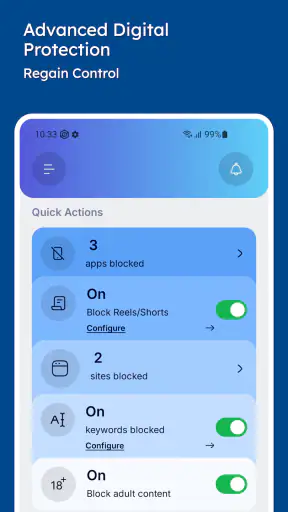
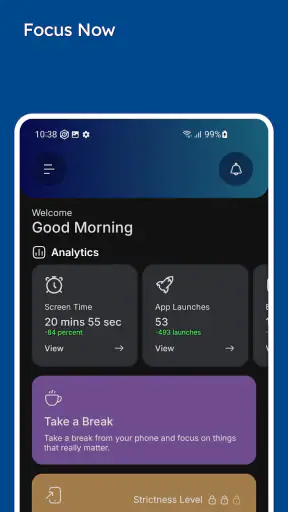
I installed Stay Focused: Site/App Blocker expecting a simple switch that would stop me opening distracting apps, but the useful part is less about pressing “block” and more about setting up a routine I can actually live with. This productivity app from INNOXAPPS LLP is aimed at people who want firmer boundaries around apps, websites, short videos, and social feeds. In my experience, it works best when I treat it as a planned barrier rather than an emergency cure for every moment of weak concentration.
The idea is easy to understand: choose what pulls you away from work or study, then use blocking and timed focus sessions to make access less automatic. The app is free to start, is suitable for Everyone, and offers optional in-app purchases ranging from $0.49 to $99.99 per item. That makes it accessible for trying the basic approach, although anyone considering paid options should look carefully at what each purchase unlocks before committing.
Getting past the setup friction
The first obstacle is usually not the block itself. It is deciding exactly what I want to change. If I select every potentially distracting app, the result can feel restrictive enough that I immediately want to disable it. A better starting point is one clearly defined problem: perhaps short-video apps during study time, or a messaging app while I am writing. A narrow first rule is easier to understand and easier to keep.
I also recommend setting up the app at a calm moment, not seconds before an important task. The setup process is more useful when I can think through the schedule, the apps involved, and the situations in which I genuinely need access. If I rush, I am more likely to create a rule that blocks something needed for work, navigation, authentication, or communication.
Before blaming the blocker when something behaves unexpectedly, I check the basics. The selected app or site needs to match the distraction I am trying to control, the focus period needs to be active, and the device needs to be in the state expected by the rule. I also make sure I have not accidentally created overlapping plans that make the result difficult to interpret. This sounds obvious, but a confusing rule is often the real reason a block appears inconsistent.
One practical habit helped me: I create a short test session before relying on the app for a long study block. I try opening the chosen distraction, confirm that the restriction behaves as intended, and then end the test normally. This gives me a chance to fix an overbroad selection while the consequences are small. It is much less frustrating than discovering during an urgent task that an essential app has been included.
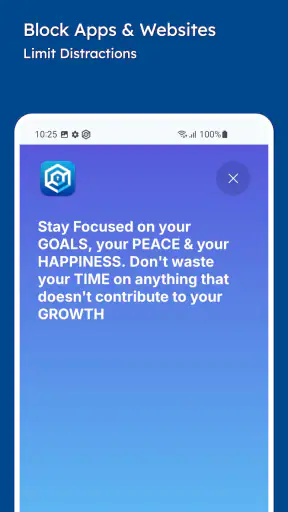
The app’s focus is broader than ordinary app timers because it also targets shorts and reels. That distinction matters. A general screen-time dashboard may tell me that I spent too long on a platform, but it does not necessarily interrupt the specific part of the platform that captures my attention. Stay Focused is more useful when my problem is the repeated urge to open a particular feed, rather than simply the total amount of phone use.
Still, I would not assume that installing it automatically solves website distractions everywhere. The exact result depends on how the rule is configured and where I am trying to browse. If a site is the main issue, I test that path directly instead of assuming an app-focused rule covers it. The same principle applies to short-video content inside another application: I verify the actual route I use, not just the name of the service.
Another point worth understanding is the difference between a temporary session and a lasting habit. A timer can protect one work period, but it does not decide what I should do during the rest of the day. I get better results when I use sessions for predictable pressure points, such as a class, a writing block, or the hour before bed, rather than trying to make the entire phone unavailable.
How I configure a rule without making it unbearable
I begin with the smallest useful group of distractions. If I am studying, that might be a short-video feed and one social app, while leaving maps, notes, calls, and an authenticator available. If I am preparing a report, I may block entertainment but keep research tools accessible. This selective approach is one of the app’s most important practical strengths because it turns self-control into a specific workflow rather than a blanket punishment.
I then choose a duration that matches the task. A session that is too short creates constant interruptions, while one that is too long can feel like a trap. I prefer a period that covers a clearly named piece of work: reading a chapter, drafting a section, or completing a set of exercises. When the goal is concrete, the block feels like support for an action instead of a restriction imposed on my whole day.
For recurring distractions, I think in terms of triggers. If I usually lose time immediately after lunch, that is a better target than an ambitious all-day plan I will resent. Likewise, if I only open reels while waiting for a download or during a difficult paragraph, I can prepare a replacement activity before starting. The blocker removes the easy escape route, but I still need something realistic to do with the empty moment.
I also keep the first configuration reversible in my thinking, even if I want the restriction to be firm. That does not mean I should constantly cancel it. It means I review whether the rule is helping after using it in real conditions. A block that prevents distractions but also interrupts essential tasks is poorly designed. Adjusting the selection is more sensible than concluding that the entire app is useless.
Recovering when a focus session goes wrong
Every blocker creates moments when I want to override it. Sometimes the urge is pure habit; sometimes I have a legitimate reason. My most effective recovery method is to pause before changing the rule and name the reason. If I need a work-related message, I handle that specific need and return to the session. If I simply feel bored, I wait a few minutes and use the time to continue the planned task. This small distinction prevents one exception from turning into a complete collapse of the routine.
When a session seems not to work, I troubleshoot in a fixed order. First, I check whether I selected the correct app, site, or content route. Next, I check whether the intended timer or schedule is currently active. Then I close and reopen the relevant app and test again. Finally, I review whether the problem happens only in one place or across the whole device. These are safe, general checks that often reveal a setup mistake without requiring dramatic changes.
If the restriction is unexpectedly strong, I use the same method in reverse. I identify what I cannot access, decide whether it is part of the intended target, and narrow the rule if necessary. I would not delete the whole plan immediately, especially if it has already helped with the main distraction. The better fix is usually to separate essential tools from entertainment and test the revised arrangement.
A useful workflow is to prepare a recovery list before starting. I keep the next task visible in a note, have offline reading ready when appropriate, and know how to contact someone through an allowed channel if I am expecting an important message. This is a non-obvious advantage of using the app deliberately: the block exposes how often I depend on impulsive phone checking to decide what comes next.
I also avoid repeatedly changing settings in the middle of a focus period. Constant adjustment becomes another form of avoidance. If the rule is merely inconvenient, I continue until the session ends and make notes afterward. If it prevents a genuinely necessary action, I correct it once and move on. That boundary keeps troubleshooting from becoming the new distraction.
When the app is not the real problem
Stay Focused can block a route to distraction, but it cannot repair an unclear schedule, an exhausting workload, or a task that is too difficult to begin. If I keep disabling a session, the issue may be that the work period is unrealistic. Breaking the task into a smaller outcome often helps more than making the restriction stricter.
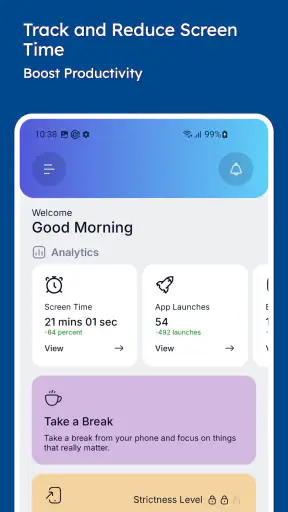
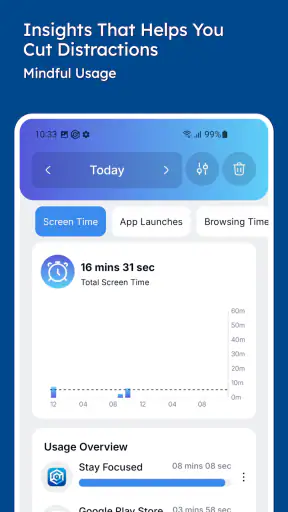
It is also not the right answer for every kind of phone problem. Someone who needs a complete digital-wellbeing report, detailed usage history, or broader device-management controls may prefer the tools built into the operating system or a more analytical screen-time service. Those alternatives can be better when measurement is the main goal. Stay Focused makes more sense when I want an active interruption at the moment I reach for a chosen distraction.
Likewise, people who need unrestricted access to many apps for work may find aggressive blocking counterproductive. A journalist checking multiple sources, a parent coordinating schedules, or someone waiting for urgent care-related communication may need a more flexible arrangement. In those cases, selective rules and short sessions are safer than trying to lock down the entire phone.
There is a human limitation too: no blocker can replace willingness to follow the plan. If I spend my time searching for ways around the restriction, the app becomes a contest rather than a tool. Its value comes from adding enough friction to break an automatic habit while leaving me responsible for choosing the next action.
Device behavior can also complicate the experience. If blocking appears unreliable, I first look for ordinary causes such as an inactive session, an incorrectly chosen target, or a change in the way I am accessing the content. I avoid assuming that every failure is a software defect. Testing one target at a time gives a much clearer answer than changing several settings together.
Who will get the most from Stay Focused?
I think this app is especially suitable for students, remote workers, writers, and anyone whose main problem is repeatedly opening the same distracting apps. It is also a good fit for people who want to reduce short-video or reels consumption specifically, since that behavior can be more compulsive than ordinary browsing. The free entry point makes it reasonable to test the method before deciding whether optional purchases are worthwhile.
It is less suitable for someone seeking a passive record of habits. If I only want charts and a historical overview, an operating-system dashboard may be clearer. It is also not ideal for a person who needs a highly customized family-management system or a workplace control platform. The appeal here is personal, immediate self-management: I choose the distractions and create boundaries around them.
The app has earned a 4.4 average from around 169 thousand ratings, with over 5 million installs, so it is clearly not an obscure experiment. Those figures suggest broad interest, but they do not guarantee that every setup will feel effortless. My own judgment is that its usefulness depends heavily on the quality of the rules I create. A thoughtful configuration feels practical; a rushed one feels irritating.
INNOXAPPS LLP has kept the central concept easy to grasp: identify the apps or content that derail attention, then put a timed barrier in front of them. That simplicity is welcome, but it also means the app cannot make planning decisions for me. The more specific my goal, the more convincing the result.
My practical verdict after using it
Stay Focused is a worthwhile productivity app for anyone who needs help interrupting automatic app-opening, especially around short videos, reels, and selected social distractions. I would begin with one target, run a short test, and only then build a recurring routine. That approach avoids the most common setup mistake: blocking too much and abandoning the system before it has a fair chance.
The app is free, rated for Everyone, and has been available since August 19, 2017. Its optional purchases may suit users who want more from the experience, but I would first judge the basic workflow against one real problem. The important question is not whether I can block everything. It is whether the chosen rule helps me finish something I would otherwise keep postponing.
My recommendation is therefore positive but specific. Choose it if you want an active, targeted barrier and are willing to spend a few minutes designing sensible sessions. Skip it if your priority is detailed analytics, broad device administration, or completely unrestricted access during complex work. Used with a realistic plan and a prepared next step, Stay Focused: Site/App Blocker gives distraction a useful pause without pretending that technology alone can create discipline.


